
Do You Need to Know How to Code to Build AI Automations?

You have an idea for an AI automation that could save hours of repetitive work.
Maybe you want to connect your favorite tools, automate customer inquiries, summarize information, or build a workflow that handles tasks for you.
Then one question stops you before you even begin:
“Do I need to know how to code?”
The short answer is: No, you don’t need to be a programmer to get started.
Today, you can build many useful AI automations using beginner-friendly tools without writing code. For many beginners, AI automation without coding is the easiest way to start experimenting with practical workflows before learning more technical skills. However, as your workflows become more advanced, understanding a few basics, like how information moves between tools, how workflows make decisions, and how to troubleshoot errors, can make a huge difference.
So the real question isn’t:
“Do I need to become a coder?”
It’s:
“What do I actually need to understand to build useful AI automations?”
Key Takeaways
- You don’t need coding skills to start building AI automations.
- AI automation without coding is possible with the help of no-code tools.
- As automations become more complex, understanding logic, data, APIs, and debugging becomes more valuable.
- AI can help write and explain code, but humans still need to test and verify the results.
- The best way to start is with a simple workflow and learn new skills as you need them.
Do You Need to Know How to Code for AI Automation?
No, you don’t need coding skills to start building AI automations. No-code AI automation is possible with the help of many beginner-friendly and no-code tools which let you create useful workflows by connecting apps, setting triggers, and adding AI-powered actions.
However, coding becomes more valuable as your automations become more complex. Understanding basics like workflow logic, data, APIs, and error handling can help you customize, troubleshoot, and build more advanced solutions.
Think of it this way:
- Simple automations: You can often build them without coding.
- Advanced automations: Basic coding knowledge can be helpful.
- Highly customized systems: Stronger programming skills may be needed.
Don’t wait to become a programmer before you start. Build simple workflows first, learn the fundamentals along the way, and add coding skills when your projects actually require them.
What Is AI Automation?
AI automation combines artificial intelligence with automated workflows to handle tasks that would normally require manual effort or human judgment.
For example, traditional automation might send an email whenever someone fills out a form. AI automation can go further by reading the information, understanding the request, categorizing it, and deciding what should happen next.
In simple terms: Automation follows a process, while AI can help the process understand and work with information.
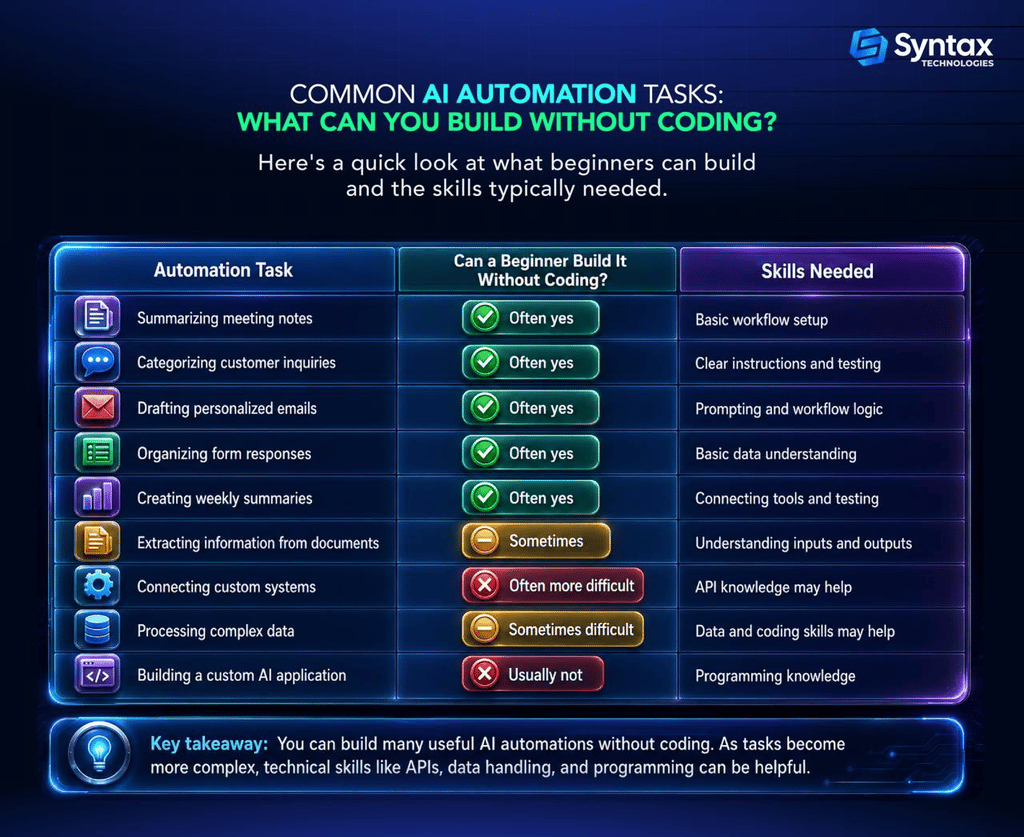
What Can You Build With AI Automation Without Coding?
You don’t need programming skills to start building useful AI automations. AI automation without coding allows beginners to create practical workflows using visual tools, existing integrations, and AI-powered actions.
What Coding Fundamentals Actually Matter for AI Automation?
You don’t need to learn programming from scratch before building AI automations. But understanding a few basic concepts can help you build better workflows and troubleshoot problems when they arise.
1. Logic and Conditions
Automation is built around simple instructions: “if this happens, then do that”. Understanding conditions helps you control how a workflow responds to different situations.
2. Inputs, Outputs, and Data
Every automation takes in information, processes it, and produces an outcome. Knowing how data moves between different steps is more important than memorizing code.
3. APIs and Integrations
You don’t need to know how to build an API, but understanding that APIs help different applications communicate can make it easier to connect tools and troubleshoot workflows.
When automations involve APIs, it’s also important to understand basic security practices, especially when handling authentication, permissions, or sensitive information. The OWASP API Security Top 10 outlines common API security risks and why secure configuration and access controls matter.
4. Reading Errors and Debugging
Things will occasionally break. Learning to read an error message, identify the failed step, and check the input can solve many common problems.
The bottom line: For beginners, understanding how a workflow works is usually more important than knowing how to write complex code. As you become more comfortable with technical concepts, AI coding tools can help you experiment with simple scripts while explaining what the code does.
What Can AI Handle for You When Building Automations?
Modern AI tools can make technical work much easier.
For example, AI may help you:
- Explain unfamiliar code
- Write small scripts
- Suggest workflow logic
- Generate API requests
- Transform data
- Explain error messages
- Identify possible mistakes
- Create code examples
- Help troubleshoot a broken workflow
This is where AI coding becomes particularly useful for beginners.
Suppose you need a small script to format data before sending it to another application.
Instead of starting with a blank screen, you might ask AI to generate an example.
But there is an important limitation.
AI can generate a solution without guaranteeing that the solution is correct for your situation. This is why testing, evaluation, and human oversight matter when using generative AI in real workflows. NIST’s Generative AI Profile specifically highlights the need to identify and manage risks associated with generative AI systems.
- It may misunderstand your request.
- It may make assumptions about your system.
- It may use outdated information.
- Or it may create code that looks convincing but does not work correctly.
That is why the goal should not be:
“Let AI do everything for me.”
A better approach is:
“Let AI help me understand, build, test, and improve the solution.”
What Humans Still Need to Understand
AI can help build workflows, generate code, and suggest solutions. But it still needs humans to provide context and make important decisions.
Here are the fundamentals you still need to understand:
- The problem: What are you trying to automate, and is automation actually the right solution?
- The workflow: What triggers the process, what information is needed, and what should happen next?
- The context: AI doesn’t automatically understand your business rules, goals, or exceptions.
- The output: You need to check whether the results are accurate and useful.
- The risks: Consider privacy, security, errors, and situations where human review is necessary. The NIST AI Risk Management Framework emphasizes managing AI risks and considering characteristics such as reliability, safety, security, transparency, privacy, and harmful bias throughout the AI lifecycle.
AI can help you build the solution, but humans still need to understand the problem and decide whether the solution actually works.
What Happens When AI-Generated Code Doesn’t Work?
This is one of the biggest concerns for beginners.
You ask AI to write code → You copy it → You run it → Something breaks.
Now what?
The good news is that you do not need to become an expert programmer overnight to begin troubleshooting. AI coding can make troubleshooting easier, especially when you use AI to explain errors and suggest possible fixes rather than blindly applying its recommendations.
You need a process.
Why AI-Generated Code Can Fail
AI-generated code isn’t always guaranteed to work perfectly. Common reasons include:
- AI misunderstood the task: The instructions or context may have been unclear.
- Missing information: The code may require an API key, file path, or specific input.
- Incorrect or outdated details: APIs and tools can change over time.
- Different environments: Your settings, permissions, or software may not match the code’s assumptions.
Don’t blindly copy AI-generated code. Use AI as a helpful assistant, but take time to understand, test, and verify what it produces.
A Beginner-Friendly Process for Debugging AI-Generated Code
If something breaks, follow these steps.
Step 1: Read the Error Message
Do not immediately copy the entire error into another AI tool and hope for a magic answer.
First, identify:
- What the error says
- Where it happened
- What the system was trying to do
Step 2: Identify the Broken Step
If your automation has ten steps, do not assume the entire workflow is broken.
Find the specific step that failed.
Step 3: Check the Input
Ask:
- Did the system receive the correct information?
- Is something missing?
- Is the format correct?
Step 4: Ask AI to Explain the Error
You can ask:
Explain this error message in plain English.
Then ask:
What are the three most likely causes?
Step 5: Test One Change at a Time
Avoid changing five things at once.
Make one change.
Test it.
Then move forward.
Step 6: Verify the Solution
Just because the error disappears does not mean the workflow is correct.
Check the output.
Does the automation actually do what you intended?
AI can help you write code, but understanding the logic behind the code makes debugging far easier.
The Best Way for Beginners to Start: Build Simple AI Workflows
One of the biggest mistakes beginners make is starting too big. They see advanced AI agents online and immediately want to build an entire autonomous business system.
The best way to explore AI automation without coding is to start with a simple process you already understand and improve it one step at a time. Here are a few beginner-friendly examples.
Example 1: Automatically Summarize Customer Feedback
Problem: A team receives hundreds of customer comments every month.
Trigger: New feedback is added to a spreadsheet.
AI step: AI summarizes the feedback and identifies common themes.
Output: A weekly summary is sent to the team.
This is a good beginner project because the workflow is easy to understand.
Example 2: Organize Job Application Information
Problem: A recruiter spends time reviewing and organizing application information.
Trigger: A new application is submitted.
AI step: AI summarizes selected information from the application.
Output: The summary is added to an internal review system.
Any workflow involving employment decisions should be designed carefully, with appropriate privacy, fairness, and human oversight considerations.
Example 3: Turn Meeting Notes Into Action Items
Problem: Teams spend too much time reviewing long meeting notes.
Trigger: Meeting notes are uploaded.
AI step: AI identifies decisions, action items, and deadlines.
Output: The action items are sent to the appropriate project workspace.
Example 4: Categorize Customer Questions
Problem: A support team receives many different types of questions.
Trigger: A new message arrives.
AI step: AI categorizes the question.
Output: The message is routed to the appropriate team.
These are examples of how AI for beginners can move beyond simply chatting with an AI tool. The goal is to connect AI to a real process.
The Shift From Prompting to Problem-Solving
Learning AI isn’t just about writing better prompts. The real value comes from using AI to solve real problems.
The progression often looks like this:
Prompting → Understanding inputs and outputs → Connecting tools → Building workflows → Solving problems
Instead of asking, “What can AI do?”, start asking, “What problem can AI help me solve?”
As you build more automations, understanding workflows, data, and logic becomes more important than simply knowing the perfect prompt.
A Practical Roadmap to Learn AI Automation as a Beginner
If you are wondering where to start, use this roadmap.
Phase 1: Understand AI Basics
Learn:
- What AI can do
- What AI cannot reliably do
- How prompts work
- Inputs and outputs
- Common use cases
This foundation is especially important for people exploring AI for beginners for the first time.
Phase 2: Build Simple Automations
Practice:
- Creating triggers
- Connecting applications
- Moving information between tools
- Testing workflows
- Focus on small projects.
Phase 3: Learn Automation Logic
Understand:
- Conditions
- Variables
- Data flow
- Error handling
At this stage, you begin thinking more systematically about AI workflows.
Phase 4: Explore APIs
Learn:
- What APIs are
- How applications communicate
- What authentication means
- How data is sent and received
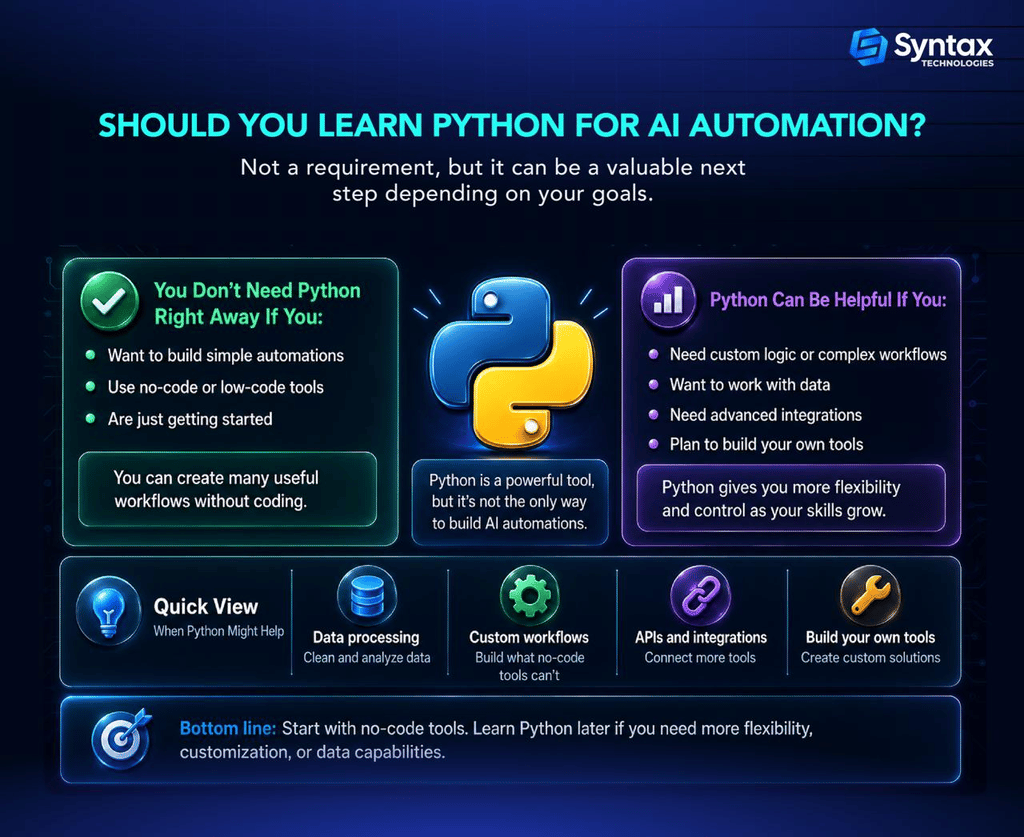
Phase 5: Learn Basic Coding When Needed
Once you encounter limitations, consider learning:
- Python
- JavaScript
Use coding as a problem-solving tool. Do not treat it as a barrier that prevents you from starting.
Real-World Scenarios: When Coding Is and Isn’t Necessary
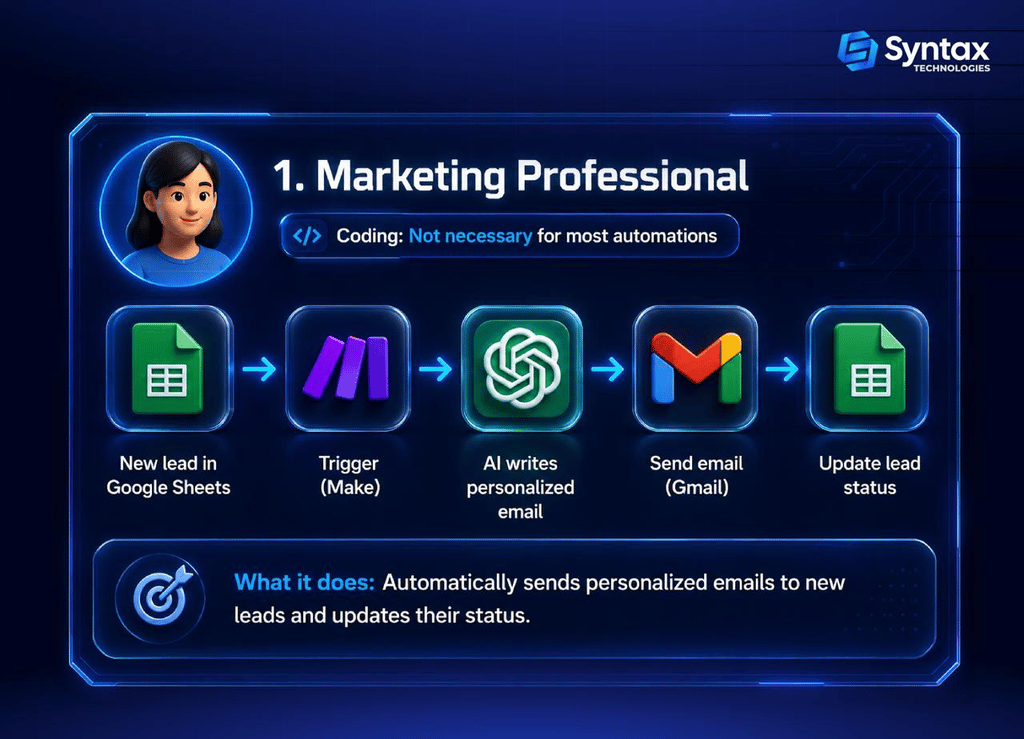
1. A Marketing Professional
Automating reports, customer feedback, or email workflows.
Coding? Usually not necessary. No-code tools can handle many tasks.
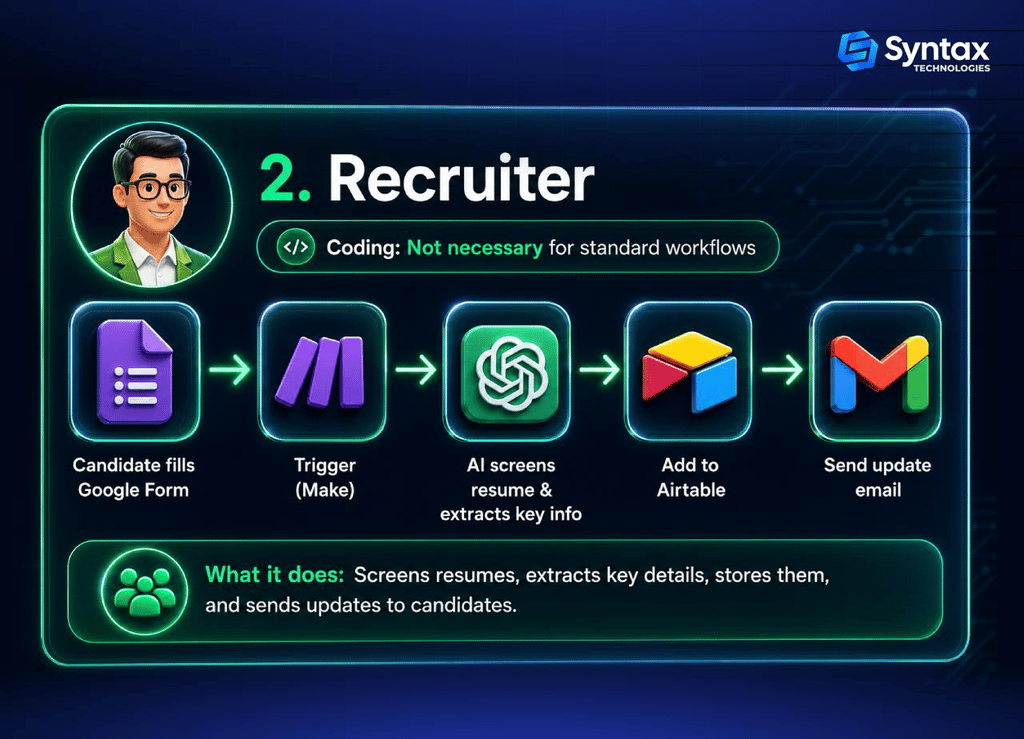
2. A Recruiter
Organizing applications, summarizing resumes, or automating follow-ups.
Coding? Usually not necessary for basic workflows. Human oversight is still important.
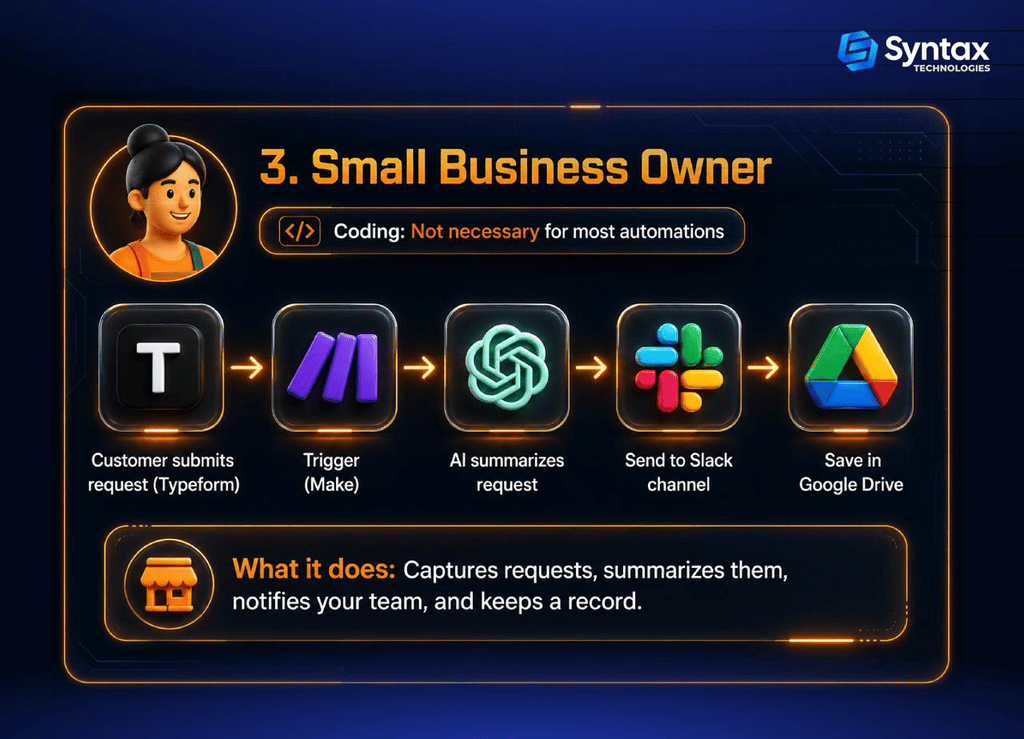
3. A Small Business Owner
Automating customer inquiries, requests, and routine tasks.
Coding? Not usually. Many standard automations can be built with no-code tools.
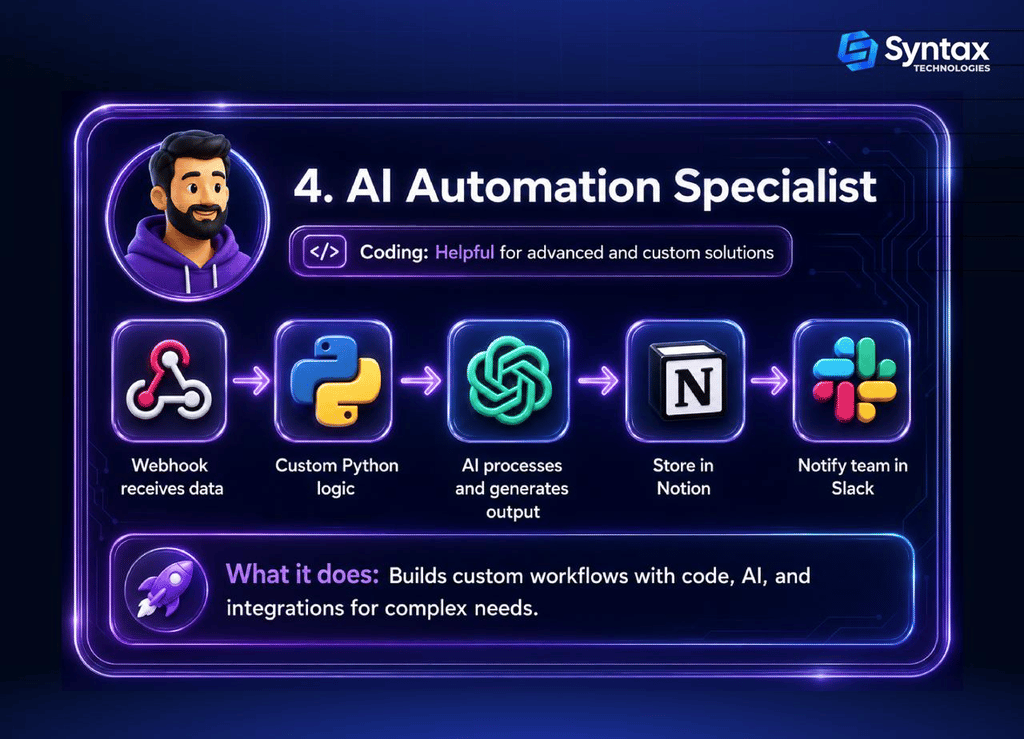
4. An AI Automation Specialist
Building custom integrations and complex workflows.
Coding? Often helpful. Programming skills can provide greater flexibility and control.
Common Mistakes Beginners Make When Learning AI Automation
1. Trying to Learn Everything First: Don’t spend months studying without building. Pick a small problem and learn as you go.
2. Starting Too Complex: Begin with one trigger, one AI action, and one output. Add complexity later.
3. Thinking No-Code Requires No Understanding: You still need to understand how data moves through a workflow and what happens when something fails.
4. Blindly Copying AI-Generated Code: Ask AI to explain the code, its inputs, and possible failure points before using it.
5. Skipping Testing: Test your automation with different inputs and unexpected situations.
6. Focusing Only on Prompts: Good prompts help, but useful automation also requires workflow and problem-solving skills.
7. Automating Before Understanding the Process: First understand the process. Then decide what is actually worth automating.
Is AI Automation a Good Skill for Your Career?
Yes, AI automation can be a valuable skill across many roles, including marketing, operations, sales, recruiting, customer support, and project management.
The real value comes from being able to:
- Identify inefficient processes
- Design useful workflows
- Choose the right tools
- Test and improve solutions
- Evaluate AI outputs responsibly
Coding can expand what you can build, but problem-solving and understanding real business needs are just as important. Learning AI automation without coding can also be a practical starting point for professionals who want to improve workflows without becoming full-time programmers.
If you’re ready to go beyond theory, Syntax Technologies’ AI Operator powered by Claude and AI Tools Fellowship gives you a hands-on way to build four working AI automations for research, content, operations, and sales in just four weeks, with no coding background required.
AI Automation Without Coding vs. Learning to Code: Which Should You Start With?
For most complete beginners, the answer is simple: Start building first.
If you can solve your problem using a visual tool, do that.
If you eventually reach a limitation, learn the technical concept that helps you move forward.
For example:
Can’t connect two systems? Learn about APIs.
Need to transform information? Learn about data formats.
Need custom functionality? Learn basic programming.
The future of AI work is unlikely to be divided neatly between:
People who code and People who don’t.
Instead, there will be a spectrum.
Some people will use AI tools without programming.
Others will use low-code solutions.
Some will write small scripts.
Others will build complete AI-powered applications.
Your goal is not necessarily to reach the most technical end of the spectrum.
Your goal is to learn enough to solve the problems that matter to you.
Frequently Asked Questions About AI Automation and Coding
Do I need to know coding to build AI automations?
No. You can build many automations without coding, though basic knowledge of logic, data, and troubleshooting helps with more advanced projects.
Can I learn AI automation without programming experience?
Yes. Start with simple workflows and learn technical skills as your projects become more complex.
What is the best AI automation tool for beginners?
It depends on your needs. Look for tools with visual workflows, easy integrations, and beginner-friendly documentation.
Should I learn Python before AI automation?
Not necessarily. Start building first. Learn Python later if you need custom logic or advanced integrations.
Can AI write automation code for me?
Yes. AI can write and explain code, but you should always test and review the output before using it.
Is no-code AI automation really possible?
Yes. Many useful automations can be built without code, but you still need to understand the workflow and the problem you’re solving.
What coding language is best for AI automation?
Python and JavaScript are both useful. The right choice depends on your goals, but you don’t need either to build your first automation.
How long does it take to learn AI automation?
You can start building simple workflows quickly. Advanced skills, such as APIs and debugging, take more time and practice.
What skills do I need for a career in AI automation?
Problem-solving, workflow design, data handling, troubleshooting, and understanding AI tools are all valuable. Coding can expand your capabilities.
Can I debug AI-generated code if I’m not a programmer?
Yes. Start by checking the error, identifying the failed step, and asking AI to explain the issue. More complex problems may require deeper technical knowledge.
So, Do You Need to Know How to Code to Build AI Automations?
No, you don’t need to be a programmer to get started. Beginner-friendly and no-code tools can help you build useful automations without writing code.
As your projects become more advanced, understanding basics like logic, data, APIs, and troubleshooting becomes increasingly valuable.
The best approach is simple: start with a small problem, build a simple workflow, and learn new skills as you need them.
Coding can expand what you build, and AI can make you faster. But the most important skill is understanding the problem and knowing how to solve it.