
Claude for Product Managers: PRDs, User Stories, and Roadmaps


Many product managers spend hours every week writing Product Requirement Documents (PRDs), refining user stories, updating roadmaps, and answering stakeholder questions. While these tasks are essential, they can also take time away from customer research, strategy, and decision-making.
That’s where Claude AI can help. Instead of replacing a product manager, Claude acts as an AI assistant that helps organize ideas, draft documents, summarize information, and speed up repetitive work. You stay in control while the AI helps with the first draft and the heavy lifting.
In this guide, you’ll learn how Claude for Product Managers can improve your daily workflow, from writing PRDs and creating Agile user stories to planning roadmaps and preparing sprint meetings.

What Is Claude?
Claude is an AI assistant developed by Anthropic that helps people write, analyze, summarize, and organize information.
It works best when you provide clear context. Claude can understand long documents, identify gaps, compare ideas, and create structured outputs that are easy to review.
For product managers, Claude helps speed up documentation and repetitive tasks while keeping product decisions firmly in the hands of the team.
Why Product Managers Are Using Claude
Modern product managers juggle dozens of responsibilities every week. Much of that work involves creating and maintaining documentation. Common challenges include:
- Writing a Product Requirement Document from scattered notes
- Turning meeting discussions into clear action items
- Creating Agile user stories
- Prioritizing competing feature requests
- Summarizing customer interviews
- Preparing sprint planning documents
- Updating a product roadmap
- Communicating clearly with engineering, design, and leadership
Claude helps speed up these tasks by producing organized first drafts that product managers can review, edit, and improve. This saves time without removing the need for human judgment.
How Claude Helps Throughout the Product Management Workflow
- Writing Product Requirement Documents (PRDs)
A Product Requirement Document (PRD) explains what should be built, why it matters, and how success will be measured. Instead of starting with a blank page, Claude can help:
- Turn rough ideas into a structured PRD
- Organize business goals
- Identify missing requirements
- Improve acceptance criteria
- Make documentation easier to read
Example prompt:
Write a PRD using these meeting notes. Include the problem statement, business goals, target users, functional requirements, success metrics, risks, and open questions.
Claude creates a solid draft, but product managers should always review it to ensure it reflects customer needs and business priorities.
- Creating Better User Stories
User stories describe a feature from the user’s perspective. They help development teams understand what needs to be built. Claude can:
- Convert requirements into Agile user stories
- Generate acceptance criteria
- Suggest edge cases
- Improve clarity and consistency
Example:
Instead of writing: “Users should save projects.”
Claude may suggest: As a user, I want to save my project so I can continue working later without losing progress.
It can also generate acceptance criteria like:
- Project saves successfully.
- Users receive confirmation.
- Saved projects appear in the dashboard.
- Errors are displayed if saving fails.
- Prioritizing Features
Feature prioritization is one of the hardest parts of AI product management because every stakeholder has different opinions.
Claude helps organize discussions by evaluating features based on frameworks like:
- RICE (Reach, Impact, Confidence, Effort)
- MoSCoW (Must Have, Should Have, Could Have, Won’t Have)
- ICE (Impact, Confidence, Ease)
It can compare features using factors such as:
- Business value
- Customer impact
- Implementation effort
- Risks
- Dependencies
- Building Product Roadmaps
A product roadmap is a high-level plan showing what the team intends to build over time.
Claude can help with:
- Organizing initiatives
- Defining milestones
- Sequencing releases
- Creating roadmap summaries
- Drafting stakeholder presentations
For example, after receiving a list of planned features, Claude can organize them into quarterly themes with clear objectives and release priorities. This makes product roadmap planning easier and more consistent.
- Summarizing Customer Feedback
Customer feedback often comes from interviews, surveys, support tickets, and sales calls.
Instead of reading hundreds of comments manually, Claude can:
- Group similar feature requests
- Identify recurring problems
- Summarize interview notes
- Highlight customer requirements
- Extract actionable insights
This allows product managers to spend more time understanding customer needs instead of sorting through large amounts of text.
- Preparing Sprint Planning
Sprint planning is the process of deciding what work will be completed during the next development cycle. Claude can prepare:
- Sprint goals
- Product backlog summaries
- Planning checklists
- Meeting summaries
- Release notes
It can also convert meeting notes into organized action items, making team communication much easier.
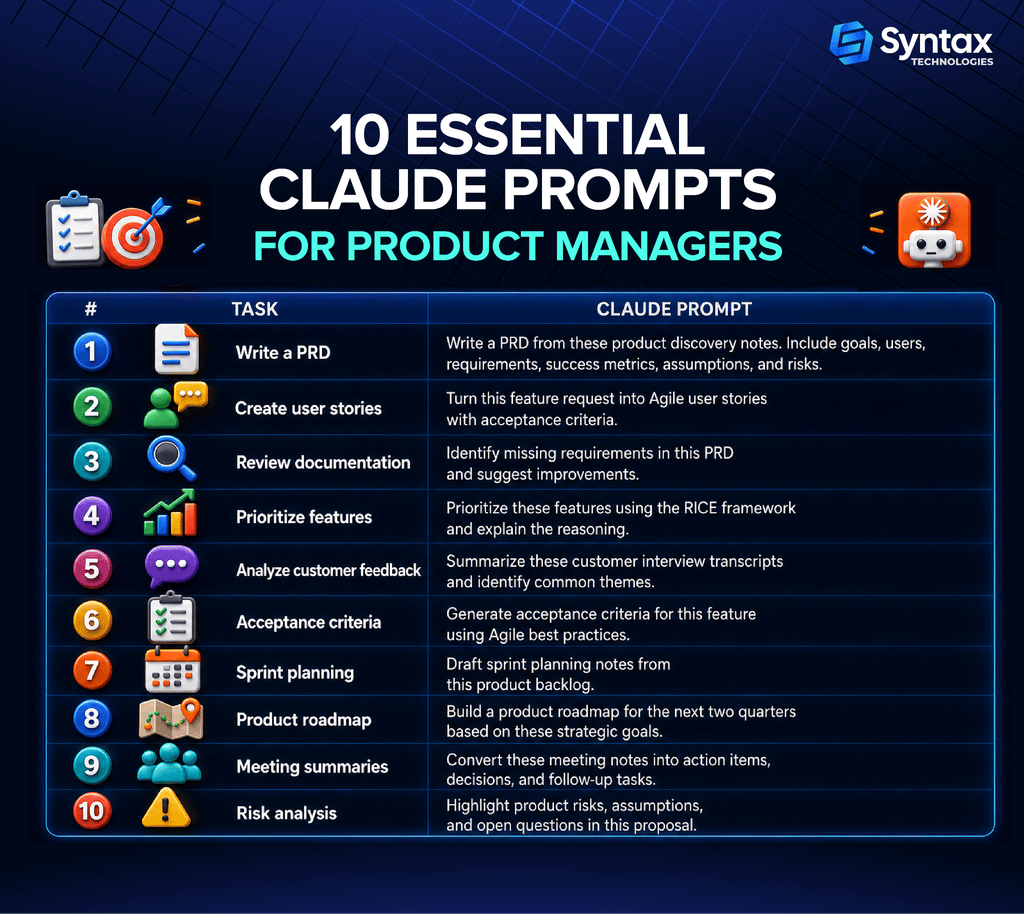
If you want to take Claude beyond everyday product tasks, the Claude Mastery Fellowship by Syntax Technologies helps you build AI systems that handle real work—from research and content to operations and sales—using Claude end to end.
In 4 weeks, you’ll set up 4 working automations with no coding background required, giving you a practical way to move from using AI for product documentation to building AI-powered workflows.
Best Practices
To get the most value from Claude AI, follow these practical tips:
- Always review AI-generated documents before sharing them.
- Provide detailed context instead of short prompts.
- Include product goals and business objectives.
- Mention your target users.
- Keep refining prompts to improve results.
- Use Claude as a collaborator, not a replacement for product thinking.
- Validate important outputs with engineering, design, and stakeholders.
The more context you provide, the better Claude can support your Product Manager workflow.
Conclusion
Claude won’t replace product managers—it helps them work smarter. By handling repetitive tasks like drafting PRDs, creating user stories, summarizing feedback, and organizing roadmaps, it gives you more time to focus on strategy, customer insights, and better product decisions.
Start with one workflow, review every AI-generated output, and build from there. Used thoughtfully, Claude can become a valuable partner that helps you plan faster, communicate more clearly, and deliver better products.