


Repetitive tasks like writing emails, summarizing documents, or creating the same type of content over and over can quickly drain your time and energy.
Most people assume building an AI assistant to handle those tasks requires coding or technical expertise. Fortunately, that’s no longer true.
With Claude Skills, you can create reusable AI assistants simply by writing clear instructions—no programming required. Whether you’re a student, freelancer, professional, or business owner, it’s an easy way to automate routine work and get more consistent results.
In this guide, you’ll learn what Claude Skills are, why they’re useful, and how to build your first Claude Skill step by step. By the end, you’ll see that creating helpful AI tools is much simpler than you might think.

What Are Claude Skills?
Have you ever found yourself giving an AI the same instructions over and over again? Whether it’s writing emails in a certain tone or summarizing documents in a specific format, repeating yourself can get old fast.
That’s exactly what Claude Skills are designed to solve.
A Claude Skill is a reusable set of instructions that teaches Claude AI how to handle a specific task. You set it up once, tell Claude what you want, and then reuse it whenever you need it—no need to explain everything from scratch each time.
Unlike a regular chat, a Claude Skill can:
- Remember your custom instructions
- Deliver consistent results
- Use reference documents like templates or PDFs
- Save time on repetitive tasks
- Work without writing a single line of code
That’s what makes Claude Skills one of the easiest ways to start using no-code AI, even if you’re a complete beginner.
Why Learn Claude Skills?
Learning Claude AI Skills isn’t just about experimenting with AI. It’s about saving time and working smarter. Here are some of the biggest benefits.
Save Time on Repetitive Tasks
Instead of typing the same prompt every day, you can simply reuse your saved Claude Skill.
For example:
- Weekly meeting summaries
- Blog outlines
- Product descriptions
- Study notes
The instructions are already prepared.
Get More Consistent Results
Have you ever received a great AI response once but struggled to recreate it later? A Claude Skill helps maintain consistency because it follows the same instructions every time.
Improve Productivity
A reusable AI workflow allows you to spend less time on routine tasks and more time making decisions, creating ideas, or learning new skills.
Support Learning and Research
Students can use Claude AI to organize lecture notes, summarize articles, and generate study guides. Researchers can speed up literature reviews and simplify complex topics into easy-to-understand explanations.
Gain Career Advantages
Employers increasingly value AI career skills. Knowing How to use Claude effectively demonstrates adaptability and digital literacy—qualities that matter across many industries.

What Can You Build Without Coding?
One of the most exciting parts of No-code AI is how many useful assistants you can create.
Here are just a few practical examples.
Resume Reviewer
Receive suggestions to improve formatting, wording, and clarity before submitting job applications.
Cover Letter Assistant
Generate customized cover letters based on different job descriptions.
Study Guide Generator
Turn lengthy notes into organized summaries, flashcards, or practice questions.
Research Assistant
Summarize articles, compare sources, and extract key insights in minutes.
Meeting Summarizer
Convert meeting transcripts into concise action items and follow-up tasks.
Blog Writing Assistant
Generate outlines, headlines, introductions, and SEO-friendly content ideas.
Social Media Content Creator
Create platform-specific posts, captions, and content calendars faster.
Email Drafting Assistant
Write professional emails while maintaining a consistent tone.
Interview Preparation Coach
Practice interview questions and receive constructive feedback on your answers.
Business Idea Brainstorming Assistant
Explore startup ideas, marketing strategies, and customer personas with structured guidance.
These examples show that you can Build AI assistant workflows for almost any repetitive task—without writing code.
Step-by-Step Guide to Building Your First Claude Skill
Ready to Build Claude Skill? Here’s a beginner-friendly walkthrough.
1. Decide the Problem You Want to Solve
Start small.
Ask yourself:
“What task do I repeat every week?”
Focusing on one problem makes your skill far more effective.
2. Open Claude
Sign in to Anthropic Claude and access the Skills feature if it’s available in your workspace.
3. Create a New Skill
Start a new Claude Skill and give it a clear, descriptive name.
Examples include:
- Meeting Notes Summarizer
- Resume Reviewer
- Study Assistant
A clear name makes it easier to find later.
4. Write Clear Instructions
Explain exactly what Claude should do.
Instead of writing:
Summarize this.
Write:
Summarize this document into five bullet points, highlight action items, and keep the language simple.
Specific instructions produce better results.
5. Upload Reference Documents
If your task depends on company guidelines, templates, style guides, or research material, upload them as supporting documents.
This gives Claude additional context.
6. Define the Output Format
Tell Claude exactly how you want the answer presented.
Examples include:
- Bullet lists
- Tables
- Step-by-step instructions
- Executive summaries
- Email format
A clear structure improves readability and consistency.
7. Test with Sample Prompts
Run several examples to see how your AI workflow performs.
Don’t rely on a single test.
8. Refine Your Instructions
Notice anything missing?
Adjust your instructions until the responses consistently meet your expectations.
9. Save and Reuse Your Skill
Once you’re satisfied, save your Claude Skill.
Next time, simply open it instead of rewriting your prompt from scratch.
Best Practices for Creating Effective Claude Skills
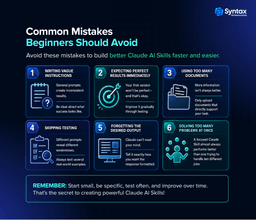
- Be specific with instructions.
- Clearly define the audience.
- Describe the desired tone.
- Specify the output structure.
- Include examples whenever possible.
- Keep instructions concise.
- Test different scenarios.
- Update your Skill regularly.
- Organize supporting documents.
- Avoid trying to solve too many unrelated problems in one Skill.

Conclusion
Building your first Claude Skill is easier than you might think. You don’t need coding experience—just a clear task and simple instructions.
Whether it’s reviewing resumes, summarizing meetings, creating study guides, or writing content, Claude Skills help you save time, work more consistently, and automate everyday tasks with AI without coding.
As AI becomes a valuable skill across industries, learning to use Claude AI can boost your productivity and career. Start with one repetitive task, build your first Claude Skill, and discover how simple creating your own AI assistant can be.