


Everyone seems to be talking about Claude Skills, Claude Cowork, and Claude Code—but what do they actually do?
If you’re new to Claude AI, it’s easy to assume they’re just different names for the same thing. They’re not. Each is designed for a different purpose, and choosing the right one can save you time, boost your productivity, and help you get much more out of AI.
Whether you want to build AI assistants, collaborate with AI on everyday work, or speed up software development, understanding these options is the first step.
In this guide, we’ll break down Claude Skills vs Cowork vs Code in simple terms, explain when to use each one, and help you decide which fits your goals, skills, and workflow best.

Why Is Everyone Talking About Claude?
Claude AI has evolved far beyond being a chatbot that answers questions.
Today, it’s a growing platform that helps people build AI assistants, automate repetitive tasks, improve productivity, collaborate on projects, and even write software. Instead of starting every conversation from scratch, users can create reusable workflows, work alongside AI on complex tasks, or build advanced solutions through code.
This flexibility makes Claude one of today’s most powerful artificial intelligence tools, whether you’re a beginner or an experienced developer.
What Are Claude Skills?
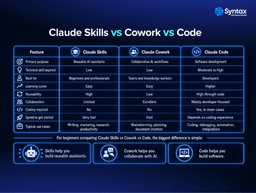
Claude Skills are reusable AI capabilities that help Claude perform specific tasks consistently. Instead of rewriting the same prompts every time, you can create a Skill once and use it whenever you need it.
One of the biggest advantages of Claude AI Skills is that they require little or no coding. That makes them ideal for beginners and anyone interested in no-code AI.
Common Use Cases
- Writing assistants for blogs, emails, and social media
- Marketing assistants that generate campaigns and product descriptions
- Study assistants that summarize notes and explain concepts
- Research assistants that organize information
- Customer support assistants that draft responses
- Personal productivity assistants for planning and task management
For example, a freelancer could create a reusable Skill that turns rough notes into polished client proposals. A student could build a study assistant that creates quizzes from lecture notes. These reusable workflows save time while improving consistency.
What Is Claude Cowork?
Claude Cowork focuses on collaboration rather than automation. Instead of creating reusable AI tools, Cowork is designed to help you work side by side with AI throughout an entire project. It encourages an interactive process where ideas evolve through conversation.
This makes Cowork especially valuable for creative and knowledge-based work.
Ideal Use Cases
- Brainstorming new ideas
- Planning projects
- Team collaboration
- Research and analysis
- Writing documents
- Strategic decision-making
Imagine you’re preparing a business proposal. Rather than asking Claude for a finished document immediately, Cowork helps you refine ideas, organize sections, improve arguments, and polish the final draft together.
What Is Claude Code?
Claude Code is designed for software development. Unlike Skills or Cowork, Claude Code supports developers throughout the programming process. It helps generate code, explain complex logic, debug issues, refactor existing projects, and automate development workflows.
Typical tasks include:
- Writing code
- Fixing bugs
- Explaining programming concepts
- Refactoring large codebases
- Building software integrations
- Automating development tasks through programming
Because it focuses on coding, Claude Code generally requires programming knowledge. While beginners can certainly use it to learn, experienced developers will get the most value from its advanced capabilities as an AI coding assistant.

Which One Should You Choose?
Choosing the right option depends on your goals rather than your technical ability.
Complete Beginners: Start with Claude Skills. They are easy to learn and require little or no coding.
Students: Use Skills for studying and Cowork for research, assignments, and brainstorming ideas.
Job Seekers: Create Skills for resume writing, interview preparation, and cover letters. Use Cowork to refine your career strategy.
Business Professionals: Cowork is excellent for meetings, planning, reports, and decision-making. Skills can automate recurring business tasks.
Content Creators: Build reusable content creation Skills while using Cowork to generate fresh ideas and improve outlines.
Freelancers: Combine Skills for repetitive client work with Cowork for creative collaboration and project planning.
Entrepreneurs: Skills can automate common business processes, while Cowork helps with strategy, marketing ideas, and product planning.
Teams: Cowork shines in collaborative environments where multiple people contribute ideas and documents.
Developers: Claude Code is the best choice for programming, debugging, automation, and advanced AI development workflows.
Can You Combine Them?
Absolutely. These tools aren’t competitors. They’re designed to complement one another.
Here’s a practical workflow:
- Use Claude Cowork to brainstorm a marketing campaign.
- Turn the finalized process into a reusable Claude Skill that consistently generates campaign drafts.
- If your business needs custom integrations or advanced AI automation, use Claude Code to build those technical solutions.
This combination allows you to move from ideas to repeatable workflows and finally to advanced custom development.
Conclusion
When comparing Claude Skills vs Cowork vs Code, there isn’t a single “best” choice.
- If you want reusable AI assistants with minimal technical effort, choose Claude Skills.
- If your focus is brainstorming, planning, and collaborating with AI, Claude Cowork is the better fit.
- If you’re building software or automating development tasks, Claude Code is the clear winner.
The right choice depends on your goals, your workflow, and your experience—not on how technical you are. The best part is that you don’t need to become a programmer to start building useful AI-powered solutions.